# Stupid Simple Network Inventory **Self-hosted network inventory and logical topology visualisation** [FranΓ§ais](README.fr.md) Β· [EspaΓ±ol](README.es.md) ![Python](https://img.shields.io/badge/Python-3.11-3776AB?logo=python&logoColor=white) ![FastAPI](https://img.shields.io/badge/FastAPI-009688?logo=fastapi&logoColor=white) ![Vue.js](https://img.shields.io/badge/Vue.js-3-4FC08D?logo=vue.js&logoColor=white) ![SQLite](https://img.shields.io/badge/SQLite-003B57?logo=sqlite&logoColor=white) ![Nginx](https://img.shields.io/badge/Nginx-009639?logo=nginx&logoColor=white) ![Docker](https://img.shields.io/badge/Docker-2496ED?logo=docker&logoColor=white) [![License: GPL v3](https://img.shields.io/badge/License-GPLv3-blue.svg)](LICENSE)
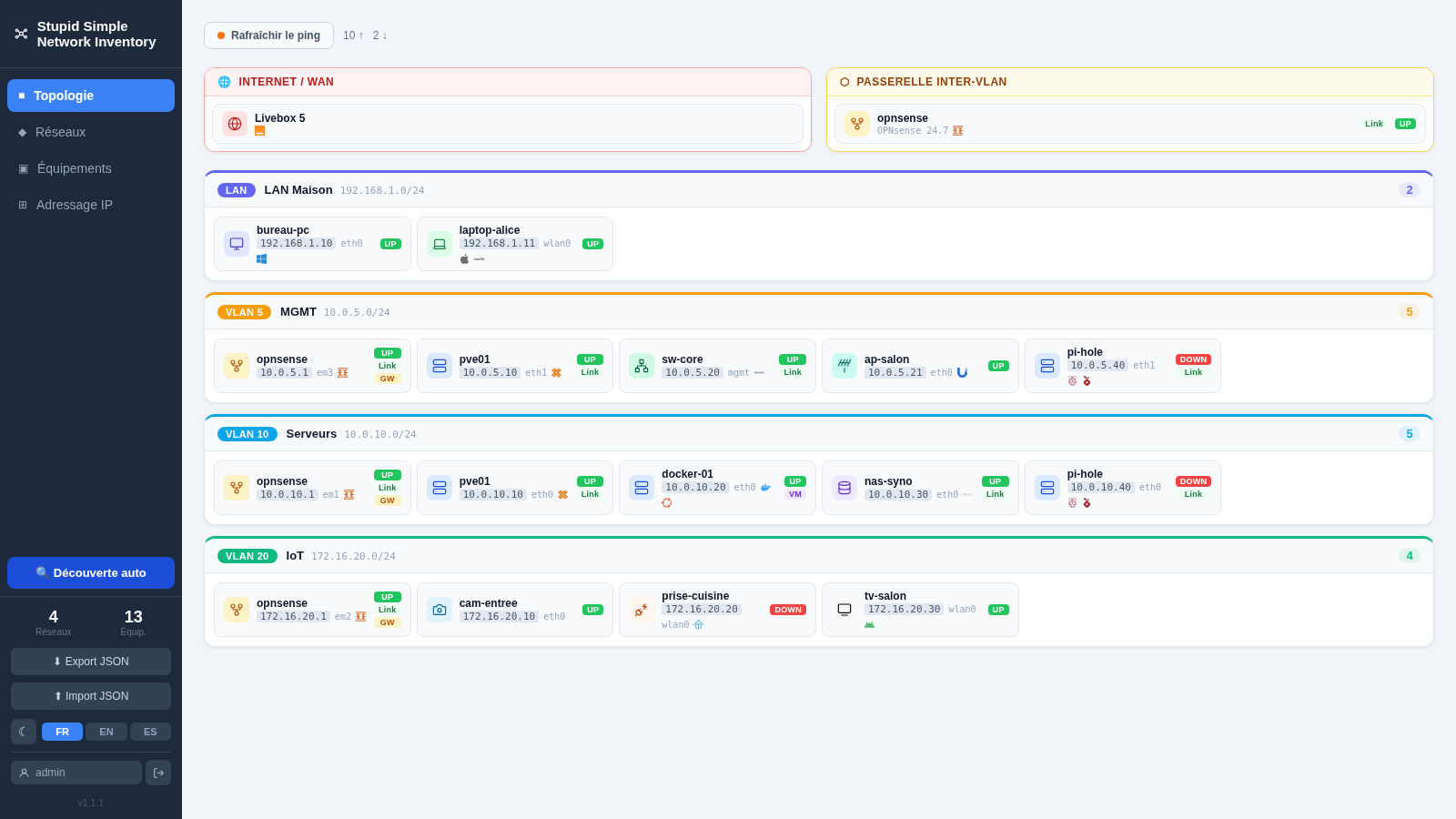
--- ![Topology view](img/topology.png) --- ## ✨ Features - πŸ—‚οΈ **Manual inventory** β€” add and manage devices (21 types) with IPs, VLANs, descriptions and optional web links - πŸ—ΊοΈ **Topology view** β€” card-based layout per network (LAN / VLAN 802.1Q), with WAN and gateway sections - 🌐 **IP addressing view** β€” IP list grouped by network, groups collapsible individually or all at once - πŸ“‘ **ICMP ping sweep** β€” check reachability of all known hosts in one click - πŸ” **Auto-discovery** β€” ping sweep + PTR DNS lookup on a subnet to import new hosts - 🏷️ **Brand logos** β€” automatic detection from name and description via [simple-icons](https://simpleicons.org/) (3,000+ logos); custom aliases for common variants (`pve`, `unifi`, `k3s`…) - πŸ–₯️ **OS detection** β€” operating system icon inferred automatically from the description (51 recognised distributions) - πŸ” **Authentication** β€” JWT-based login with forced password change on first use - πŸŒ™ **Dark mode** β€” light / dark theme toggle - 🌍 **i18n** β€” French, English, Spanish ## πŸ› οΈ Stack | Layer | Technology | |-------|-----------| | Backend | FastAPI + SQLAlchemy + SQLite (Python 3.11) | | Frontend | Vue 3 + Vite, served by Nginx | | Auth | JWT HS256, 24-hour expiry | | Runtime | Docker Compose | --- ## πŸš€ Quick start ```bash # 1. Clone and enter the project git clone https://git.raspot.in/olivier/stupid-simple-network-inventory.git cd stupid-simple-network-inventory # 2. Create the data directory owned by the current user mkdir -p db_data # 3. Configure environment (required for correct bind-mount ownership) cp .env.example .env # Edit .env: # DOCKER_UID / DOCKER_GID β†’ output of: id -u && id -g # INITIAL_ADMIN_PASSWORD β†’ set to avoid the default admin/admin bootstrap # 4. Build and start docker compose --env-file .env up --build -d # 5. Open http://localhost:8080 in your browser ``` ### First login | Case | Credentials | Behaviour | |------|------------|-----------| | `INITIAL_ADMIN_PASSWORD` set | `admin` / `` | Normal login | | `INITIAL_ADMIN_PASSWORD` unset | `admin` / `admin` | Forced password change before accessing the app | --- ## πŸ”„ Updating Data is stored in `./db_data/` (bind-mount), which is never touched by container rebuilds. Updating is safe: ```bash git pull docker compose up --build -d ``` Database migrations run automatically on startup β€” no manual steps required. --- ## βš™οΈ Configuration All configuration is via environment variables. See `.env.example` for the full list with descriptions. | Variable | Default | Description | |----------|---------|-------------| | `SECRET_KEY` | auto-generated | JWT signing key. Set explicitly in production. | | `INITIAL_ADMIN_PASSWORD` | _(empty)_ | Bootstrap admin password. If unset, `admin/admin` is used with forced change. | | `ALLOWED_ORIGINS` | `*` | CORS allowed origins (comma-separated). Set to your domain in production. | | `BIND_ADDRESS` | `0.0.0.0` | IP address to listen on. Set to the interface facing the reverse proxy. | | `DNS_SERVER` | _(empty)_ | DNS server for PTR lookups during auto-discovery. Pre-fills the field in the UI (overridable per scan). Leave empty to disable reverse DNS. | | `DOCKER_UID` / `DOCKER_GID` | `1000` | UID/GID for the backend process. Must match the host user owning `./db_data/`. | ```bash cp .env.example .env # Edit .env β€” at minimum set DOCKER_UID, DOCKER_GID, INITIAL_ADMIN_PASSWORD docker compose --env-file .env up --build -d ``` --- ## πŸ”’ Security ### Secret management Two options depending on your security requirements. #### Option A β€” Auto-generated secret (recommended for single-node) Leave `SECRET_KEY` unset (or empty) in `.env`. On first start the backend generates a random 64-character hex key, writes it to `db_data/secret_key.txt` with permissions **0600**, and reuses it on every subsequent restart. The secret never appears in an environment variable, a compose file, or a log. ```bash # .env β€” leave the line empty or remove it SECRET_KEY= ``` The only requirement is that `db_data/` is backed up (it already contains the database). #### Option B β€” Docker Compose file secret Stores the secret in a file on the host, outside version control, and mounts it into the container. The value never appears in an environment variable. ```bash # Generate and store the secret outside the project directory mkdir -p ~/.secrets python3 -c "import secrets; print(secrets.token_hex(32))" > ~/.secrets/topologie_secret_key chmod 600 ~/.secrets/topologie_secret_key ``` Then uncomment the `secrets:` blocks in `docker-compose.yml` (see comments in that file) and remove `SECRET_KEY` from `.env`. Docker Compose merges the override automatically: ```bash docker compose up -d ``` ### Key rotation To rotate the JWT secret (invalidates all active sessions): ```bash # Option A β€” environment variable (recommended) # Set a new SECRET_KEY in your deployment config and restart # Option B β€” file rotation docker compose stop backend rm db_data/secret_key.txt docker compose start backend # All users will need to log in again ``` ### HTTPS This application does not terminate TLS. For production use, place it behind a reverse proxy that handles HTTPS. #### Nginx ```nginx server { listen 443 ssl; server_name inventory.example.com; ssl_certificate /etc/letsencrypt/live/inventory.example.com/fullchain.pem; ssl_certificate_key /etc/letsencrypt/live/inventory.example.com/privkey.pem; location / { proxy_pass http://127.0.0.1:8080; proxy_set_header Host $host; proxy_set_header X-Real-IP $remote_addr; proxy_set_header X-Forwarded-For $proxy_add_x_forwarded_for; proxy_set_header X-Forwarded-Proto $scheme; } } ``` #### Traefik β€” Docker labels Add these labels to the `frontend` service and connect it to the network shared with Traefik: ```yaml # docker-compose.override.yml services: frontend: labels: - "traefik.enable=true" - "traefik.http.routers.inventory.rule=Host(`inventory.example.com`)" - "traefik.http.routers.inventory.entrypoints=websecure" - "traefik.http.routers.inventory.tls.certresolver=letsencrypt" - "traefik.http.services.inventory.loadbalancer.server.port=8080" networks: - internal - traefik_public # network shared with your Traefik instance networks: traefik_public: external: true ``` #### Traefik β€” Dynamic configuration (file provider) If Traefik is not running in Docker (or you prefer the file provider), drop a file in your dynamic config directory: ```yaml # /etc/traefik/dynamic/inventory.yml http: routers: inventory: rule: "Host(`inventory.example.com`)" entryPoints: - websecure tls: certResolver: letsencrypt service: inventory-svc services: inventory-svc: loadBalancer: servers: - url: "http://127.0.0.1:8080" ``` Traefik picks up the file automatically β€” no restart required. For local-only use, bind to loopback to prevent accidental LAN exposure: ```yaml # docker-compose.override.yml services: frontend: ports: - "127.0.0.1:8080:8080" ``` ### Container hardening | Measure | Backend | Frontend | |---------|---------|----------| | Non-root user | `DOCKER_UID:DOCKER_GID` (host user) | `nginx` (UID 101) | | `cap_drop: ALL` | βœ“ | βœ“ | | `cap_add: NET_RAW` | βœ“ (ping) | β€” | | `no-new-privileges` | β€” ΒΉ | βœ“ | | Healthcheck | βœ“ | βœ“ | ΒΉ Omitted on the backend: ping uses file capabilities (`cap_net_raw=ep`); `no-new-privileges` suppresses the file effective bit and would prevent the subprocess from acquiring `CAP_NET_RAW` in its effective set even though the parent holds it in its permitted set. --- ## πŸ’Ύ Data persistence All data is stored in `./db_data/`: | File | Description | |------|-------------| | `topology.db` | SQLite database | | `secret_key.txt` | Auto-generated JWT secret (0600 permissions) | **Backup**: `cp -r db_data/ db_data.bak/` **Restore**: stop the stack, replace `db_data/`, restart. --- ## 🏷️ Brand logo detection Logo detection runs automatically against the device **name** and **description** fields (case-insensitive, whole-word matching). No manual configuration needed. Logos are displayed in two places: - **Topology view** β€” small inline SVGs on each device chip - **Device list** β€” coloured badge(s) in the device card Multiple logos can appear simultaneously if several keywords match. **Source**: the [simple-icons](https://simpleicons.org/) library is fully imported (~3,000 logos). Detection runs in two passes: 1. **Curated aliases** β€” ~50 entries for cases not covered by the exact icon title: common aliases (`pve` β†’ Proxmox, `unifi` β†’ Ubiquiti, `k3s` β†’ Kubernetes, `routeros` β†’ MikroTik…), icons absent from simple-icons (Eaton, Riello, Vertiv, Zabbix, Centreon, Nagios, PRTG, Free, Bouygues, SFR, Windows…), custom colours or shapes. 2. **Auto-detection** β€” all remaining simple-icons logos (title β‰₯ 4 characters) are automatically available: Grafana, Gitea, Portainer, GitLab, Immich, and thousands more, with no additional code. --- ## πŸ§‘β€πŸ’» Development ### Backend tests ```bash cd backend pip install -r requirements.txt -r requirements-test.txt pytest tests/ -v ``` ### Local dev (without Docker) ```bash # Backend cd backend pip install -r requirements.txt uvicorn main:app --reload # Frontend (separate terminal) cd frontend npm install npm run dev # Vite dev server on :5173, proxies /api/ to :8000 ``` --- ## πŸ”§ Troubleshooting ### Scan returns hundreds of false positives (proxy-ARP / UniFi) **Symptom** β€” Auto-discovery reports as many hosts as there are addresses in the subnet (e.g. 254 for a `/24`), while only a few machines are actually present. **Cause** β€” Some network equipment (notably UniFi Security Gateway, Dream Machine, and similar devices) enables proxy-ARP and responds to ICMP pings for **every** IP in the subnet, spoofing the source IP of the reply. The built-in source-IP check in the scanner cannot filter these false positives. **Fix** β€” Enable the **"TCP check (anti proxy-ARP)"** option in the scan configuration screen. This option uses TCP instead of ICMP to detect live hosts (ports 22, 80, 443, 8080, 8443): - A **real host** replies with RST (port closed) or accepts the connection β†’ marked alive. - A **ghost IP**: the gateway silently drops the SYN without replying β†’ timeout β†’ discarded. > **Note**: a device whose firewall silently drops (*DROP*, without RST) **all** probed ports will not be discovered automatically and must be added manually. ### Some devices are missing from the scan (ICMP rate-limiting) **Symptom** β€” A few hosts (APs, switches, IoT devices) respond to a direct ping but are not found during a full subnet scan. **Cause** β€” When 100 concurrent ICMP workers flood a `/24`, some devices or managed switches rate-limit ICMP responses. The device drops the probe during the scan even though a single ping works fine. **Fix** β€” Two options: - Enable **"Soft scan (slow ICMP)"**: reduces concurrency from 100 to 10 workers. The scan takes longer but ICMP probes are spread out, avoiding rate-limiting. Best for subnets without proxy-ARP. - Enable **"TCP check (anti proxy-ARP)"**: bypasses ICMP entirely. TCP probes are not subject to the same rate-limiting. Best when both proxy-ARP and rate-limiting are present. --- ## πŸ—οΈ Architecture See [`docs/architecture.md`](docs/architecture.md) for the detailed request flow, Docker setup, and authentication model. --- ## πŸ€– Built with AI assistance This application was developed entirely with the help of AI coding assistants: - **[Claude Code](https://claude.ai/code)** (Anthropic) β€” used throughout the project for architecture design, backend API (FastAPI, SQLAlchemy, authentication, ICMP discovery), frontend components (Vue 3, CSS topology layout, i18n, dark mode), Docker & Nginx configuration, and documentation. - **[Codex](https://openai.com/codex)** (OpenAI) β€” also used during development for code generation and suggestions across the entire codebase. --- ## πŸ“„ License This project is licensed under the [GNU General Public License v3.0](LICENSE). You are free to use, modify and distribute this software under the terms of the GPL v3. Any derivative work must be distributed under the same license.