# Boîte à outils Windows logiciels libres
Petite boîte à outils Windows pour installer des packs de logiciels libres avec `winget` et supprimer certaines applications intégrées à Windows.
[](#prerequis)
[](#packs-automatises)
[](#installateur-interactif)
[](./LICENSE)
[English](./README.md) | **Français**
---
## Contenu du dépôt
| Chemin | Rôle |
| --- | --- |
| [`powershell/libres-softwares-install.ps1`](./powershell/libres-softwares-install.ps1) | Installateur interactif pour une liste de logiciels sélectionnés. |
| [`powershell/Winget-Remove-BuiltInApps.ps1`](./powershell/Winget-Remove-BuiltInApps.ps1) | Suppression de certaines applications Windows intégrées pour l'utilisateur courant. |
| [`winget/libre-soft-start-pack.yaml`](./winget/libre-soft-start-pack.yaml) | Pack automatisé de départ : Firefox ESR, 7-Zip et VLC. |
| [`winget/libre-soft-base-libreoffice.yaml`](./winget/libre-soft-base-libreoffice.yaml) | Pack de départ avec LibreOffice. |
| [`winget/libre-soft-base-onlyoffice.yaml`](./winget/libre-soft-base-onlyoffice.yaml) | Pack de départ avec ONLYOFFICE. |
## Prérequis
Lance les commandes depuis un **terminal administrateur** sous Windows.
Active d'abord la prise en charge des configurations winget :
```powershell
winget configure --enable
```
Les packs YAML automatisés déclarent actuellement un prérequis **Windows 11 24H2** ou plus récent.
## Installateur Interactif
Choisis les logiciels à installer depuis un menu PowerShell.
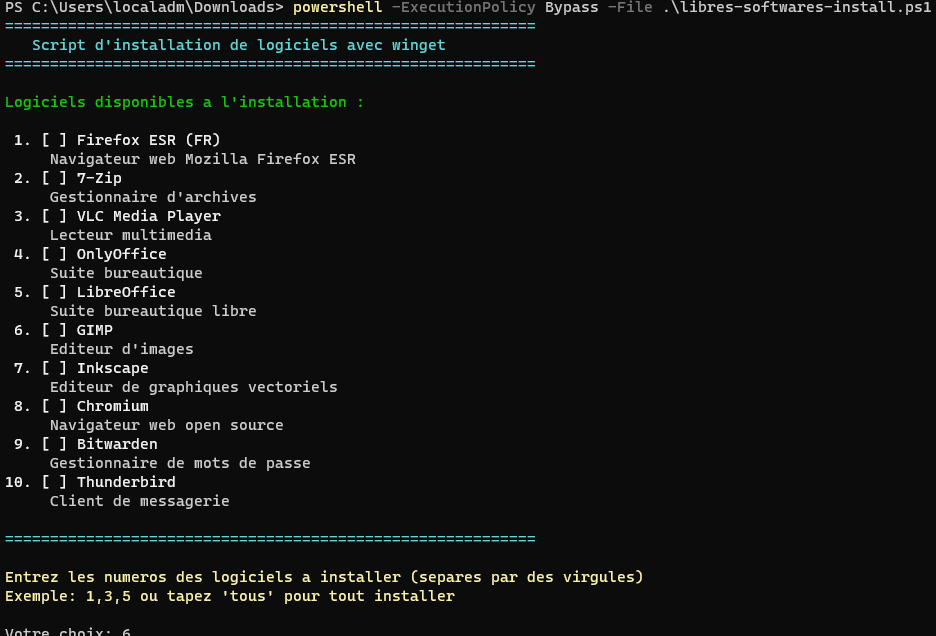
Commande à lancer depuis la racine du dépôt :
```powershell
powershell -ExecutionPolicy Bypass -File .\powershell\libres-softwares-install.ps1
```
Logiciels disponibles :
| Logiciel | ID winget |
| --- | --- |
| Firefox ESR (FR) | `Mozilla.Firefox.ESR.fr` |
| 7-Zip | `7zip.7zip` |
| VLC Media Player | `VideoLAN.VLC` |
| ONLYOFFICE | `ONLYOFFICE.DesktopEditors` |
| LibreOffice | `TheDocumentFoundation.LibreOffice` |
| GIMP | `GIMP.GIMP.3` |
| Inkscape | `Inkscape.Inkscape` |
| Chromium | `Hibbiki.Chromium` |
| Bitwarden | `Bitwarden.Bitwarden` |
| Thunderbird | `Mozilla.Thunderbird` |
## Packs Automatisés
Utilise les fichiers de configuration winget pour obtenir une installation reproductible.
| Pack | Contenu | Commande |
| --- | --- | --- |
| Pack de départ | Firefox ESR, 7-Zip, VLC | `winget configure --file .\winget\libre-soft-start-pack.yaml --accept-configuration-agreements` |
| Pack LibreOffice | Pack de départ, LibreOffice | `winget configure --file .\winget\libre-soft-base-libreoffice.yaml --accept-configuration-agreements` |
| Pack ONLYOFFICE | Pack de départ, ONLYOFFICE | `winget configure --file .\winget\libre-soft-base-onlyoffice.yaml --accept-configuration-agreements` |
Exemple :
```powershell
winget configure --file .\winget\libre-soft-start-pack.yaml --accept-configuration-agreements
```
## Supprimer des Applications Intégrées
Le script de nettoyage désinstalle certaines applications Windows pour l'utilisateur courant.
```powershell
powershell -ExecutionPolicy Bypass -File .\powershell\Winget-Remove-BuiltInApps.ps1
```
Les applications visées incluent des composants Xbox, Outlook for Windows, Hub de commentaires, OneDrive, Teams, Microsoft To Do, des applications Bing, Clipchamp et des packages intégrés associés.
## Note de Maintenance
Lorsqu'un script, un ID de package, le contenu d'un pack ou une commande documentée change, mets à jour les deux fichiers README :
- [`README.md`](./README.md) pour l'anglais.
- [`README.fr.md`](./README.fr.md) pour le français.
## Licence
Ce projet est distribué sous licence [GPL-3.0-or-later](./LICENSE).